Visualizing Agreements: The Role and Selection of Partnership Icon Sets
In digital and print communication, icons serve as immediate visual shorthand. When the topic involves business relationships, transactions, or collaborations, a specific subset of imagery becomes essential. This is where dedicated icon sets focusing on deals, partnerships, and related concepts come into play. They are more than just decorative graphics; they are functional tools that can clarify navigation, emphasize key points in an infographic, or establish a thematic tone on a website.
What Distinguishes a Specialized Partnership Icon Collection
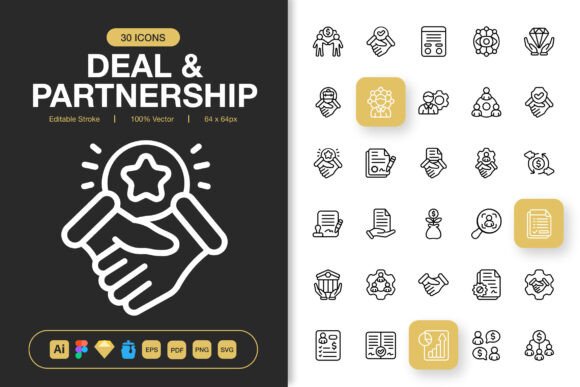
A general icon library might include a handful of business-related symbols. However, a set explicitly built around Deal and Partnership Icons concentrates depth and variety within this niche. Such a collection typically offers multiple representations of core ideas: signed contracts, handshakes, merging arrows, growth charts, monetary exchange, and collaborative teams. The distinction lies in the focused exploration of this single theme across many visual styles and contexts, providing a cohesive toolkit rather than a few scattered images.
The utility is amplified when the set is designed with minimalist principles. Clean lines, simple forms, and uncluttered compositions ensure the icons communicate quickly and remain legible at various sizes—from a tiny mobile app button to a large poster. This minimalist approach also makes the icons highly adaptable, fitting seamlessly into diverse design projects without dominating the visual landscape.
Evaluating Key Features for Practical Application
When assessing any professional icon set, the specifications directly impact how easily you can integrate them into your workflow. A comprehensive offering, like the Deal and Partnership Icons set described, provides multiple file formats, which addresses a primary consideration for users working across different platforms and software.
The Importance of Multi-Format and Editable Files
The inclusion of source files (Adobe Illustrator), along with dedicated files for Figma, Sketch, and Iconjar, speaks to a designer-centric approach. It means the icons are not static deliverables but starting points. The editable stroke feature is particularly valuable, allowing you to adjust line weights, change colors, or modify elements to match your existing brand guidelines precisely. This level of customization moves the set from a ready-made product to a flexible resource.
Comparatively, many icon resources offer only static PNG or SVG files. While usable, they lock you into a predefined style. The trade-off here is clear: sets with source files offer greater long-term flexibility but may require access to and familiarity with vector editing software. For teams that iterate heavily on visual assets, this flexibility is a significant strength.
Resolution and Scalability Considerations
The provided size range—from 32px to 512px PNG files—covers most common digital use cases. This pre-generated range saves time for projects requiring specific pixel dimensions. However, the true scalability comes from the vector formats (EPS, SVG, AI). These allow you to scale icons to any size for print media like flyers, banners, or books without loss of quality, a crucial factor for projects spanning both digital and physical outputs.
Identifying the Best-Fit Scenarios and Potential Limitations
A specialized set like this is not a universal solution for all icon needs. Its value is highest in specific contexts.
It is an excellent fit for projects where the core theme is business development, collaboration, finance, or legal agreement. Examples include:
- A website for a merger & acquisitions consultancy.
- A mobile app focused on connecting business partners.
- An infographic explaining the steps of a contractual deal.
- Marketing flyers for a co-working space or startup incubator.
- Social media posts highlighting corporate partnerships.
In these situations, the icons provide immediate thematic consistency. Using a generic set might force you to compromise with less relevant imagery, potentially diluting the message.
When Alternative Options Might Be Necessary
The decision to choose a niche set over a broader one involves weighing scope against focus. If your project requires icons for a wide array of topics beyond partnerships—such as user interface actions (settings, user profiles), common symbols (email, phone), or diverse categories—then a comprehensive general icon library might be a more practical starting point. You could supplement it with a few specialized partnership icons.
Another consideration is style alignment. Even within minimalist design, there are variations: geometric, rounded, sharp, etc. If the specific aesthetic of the Deal and Partnership Icons set does not align with your existing visual language, despite editable features, the effort required to modify every icon may outweigh the benefit. In such cases, finding a set that matches your style from the outset, even if it has fewer partnership-focused icons, could be more efficient.
The Tradeoff Between Customization and Immediate Use
The "easy drag and drop" promise for pre-sized PNGs is advantageous for rapid prototyping or for users without design software. However, the full customization potential resides in the source files, which require specific tools and skills. This presents a common tradeoff in digital assets: convenience versus control. For a non-designer needing quick visuals, the PNGs are sufficient. For a design team building a branded product, the source files are the core value.
Making an Informed Selection Decision
Choosing a visual resource is a practical decision. Begin by auditing your project's actual needs. How frequently will you need icons representing deals, handshakes, or growth? Is this the central theme or a secondary one? Then, examine your technical environment: which design tools does your team use? If you use Figma, the inclusion of a Figma file is a direct benefit; if you only use PowerPoint, the PNGs may be your primary resource.
Finally, consider longevity. Is this a one-time project, or are you building a reusable asset library for your organization? The availability of EPS Version 10, PDF, and SVG files suggests the set is built for longevity and cross-platform compatibility, making it a candidate for a growing resource library.
A set like Deal and Partnership Icons, with its thematic focus, minimalist design, and extensive file support, stands out when your project's content aligns closely with its theme and your workflow requires adaptable, high-quality assets. It solves the problem of searching for disparate, high-quality partnership symbols across different sets. For broader projects, it might serve as a powerful supplement rather than the foundation. By aligning the set's distinct strengths with your specific requirements for quality, format, and thematic relevance, you can make a more grounded decision about its suitability for your next design challenge.