Gaming Store Icons: A Complete Visual Toolkit for Modern Projects
In the world of digital design, clarity and consistency are paramount. Whether you're building a website for a new gaming platform, designing an app for hobbyists, or creating marketing materials for an online store, your visual elements need to communicate instantly and look polished across every device and medium. This is where a dedicated icon set like Gaming Store Icons becomes an invaluable asset. It's not just a collection of pictures; it's a complete, high-quality visual toolkit designed to bring a unified and professional look to any project that touches on gaming, commerce, or digital interfaces.
What Makes This Icon Set Stand Out?
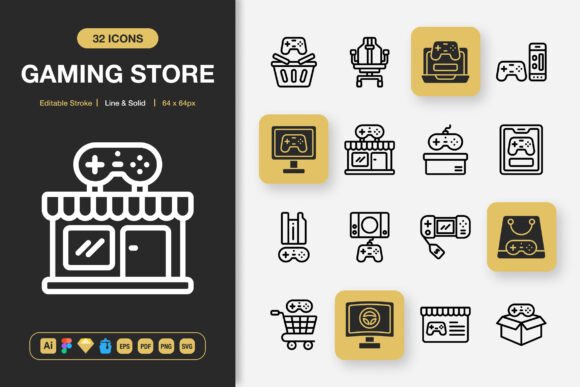
At its core, Gaming Store Icons is a set of 100 meticulously crafted icons, offered in both line and solid styles. The minimalist design approach ensures they are versatile and never overpower your content. Each icon is built with an editable stroke, meaning you can easily adjust the weight and thickness to match your specific design system without losing quality. This level of customization is a key feature for professionals who need to integrate assets into an existing brand aesthetic.
The value lies in its completeness. Instead of piecing together icons from various sources with inconsistent styles, you get a single, coherent library. This solves a common problem for creators: the frustration of mismatched visuals that make a project feel amateurish. For entrepreneurs, bloggers, or educators creating content around gaming, having this ready-made visual vocabulary saves significant time and effort, allowing you to focus on your message and user experience.
Unlocking Creativity Across Dozens of Use Cases
The true appeal of this set is its incredible range of applications. The included file formats are specifically chosen to support work in virtually any environment. Let's explore some realistic scenarios.
For Digital Interfaces and Apps
A freelance web developer building a site for a board game retailer can use the SVG files to create crisp, scalable navigation icons for categories like "New Releases," "Pre-orders," or "Strategy Games." The PNG files at multiple sizes (from 32px to 512px) are perfect for a mobile app developer needing icons for buttons and tabs that look perfect on every screen resolution, from phones to tablets.
For a UI/UX designer working in Figma or Sketch, having the native Figma File and Sketch File means they can drag and drop icons directly into their prototypes, speeding up the design process immensely. The Iconjar file further organizes the library for quick access within these design tools.
For Print and Marketing Materials
Think beyond the screen. A small business owner running a local gaming cafe can use the EPS and PDF versions to create consistent flyers and posters advertising events or new stock. The icons for concepts like "Tournament," "Coffee," or "Community" can be integrated into banner designs for in-store promotion. An educator creating an infographic about the history of video games for a classroom poster can use the solid style icons to visually represent different eras or console types, making the information more engaging.
For bloggers and content marketers, the PNGs with transparency are ideal for creating custom graphics for social media posts, YouTube channel art, or featured images in articles about gaming culture, all maintaining a clean, modern look.
For Long-Term Projects and Publishing
The inclusion of the Adobe Illustrator source file is crucial for deeper customization. A professional graphic designer working on a book about game design theory can open this file, change colors to match the book's palette, or even combine icon elements to create new, unique symbols for chapter headings. This flexibility ensures the set isn't a one-time resource but a foundational element you can adapt for future projects as your needs evolve.
Key Considerations Before You Start Using Them
While the Gaming Store Icons set is designed for ease of use, a few practical observations will help you get the best results. First, assess your primary medium. If your work is predominantly for web and app development, the SVG format will be your go-to for its scalability. For print work, lean on the EPS and high-resolution PNG files.
Second, consider your skill level with design software. The drag-and-drop ease with the Figma, Sketch, and Iconjar files is beginner-friendly. However, to leverage the full customizable power of the editable strokes in the Illustrator file, some basic knowledge of vector editing is beneficial. The provided Readme.txt file is there to guide you through the formats and their best uses.
Finally, think about scope. With 100 icons, the set covers a broad range of concepts relevant to stores, gaming, and digital interaction. It's wise to browse the full catalog mentally mapping which icons suit your immediate project. This planning helps you avoid later redesigns and ensures a cohesive visual language from the start.
Changing Your Next Project with Minimalist Visuals
Adopting a professional icon set like this is about elevating your project's communication. For the hobbyist creating a personal blog, it brings a polished feel that attracts readers. For the marketer crafting a campaign, it builds visual consistency that strengthens brand recognition. For the freelancer delivering a client's website, it provides a reliable, high-quality asset that meets professional standards without requiring custom illustration work.
The Gaming Store Icons toolkit removes a major barrier in creative and professional work: the search for perfect, consistent visuals. By offering multiple styles, editable vectors, and every critical file format, it empowers you to start implementing a clear, attractive design immediately, across websites, mobile apps, books, social media, infographics, flyers, print, banners, posters, and much more. It's a practical investment in the quality and efficiency of your visual communication, allowing you to focus on what matters most—your content and your audience.