Beauty and Salon Icons: A Toolkit for Visual Communication
Imagine you’re launching a new spa’s booking app, designing a flyer for a hair salon, or creating an online course about skincare. You need visuals that instantly convey concepts like a haircut, a facial treatment, or a nail polish bottle. Finding the right imagery can be time-consuming, and using inconsistent clip art can make your project look amateurish. This is where a dedicated set of Beauty and Salon Icons becomes not just a decorative element, but a functional tool for clear and efficient communication.
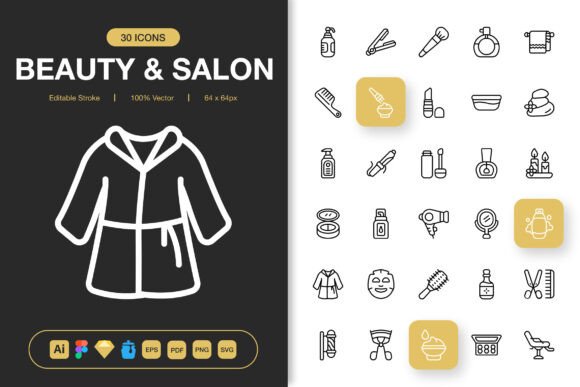
Beauty and Salon Icons is a comprehensive collection of minimalist icon designs specifically crafted for the beauty, wellness, and personal care industries. It’s more than just pictures; it’s a visual language designed to be understood quickly across various mediums. The set offers high-quality, editable symbols that represent everything from basic tools like combs and scissors to modern services like laser treatments and spa massage stones. Their minimalist design ensures they remain crisp and recognizable whether they’re tiny on a mobile app button or large on a printed poster.
Where These Icons Make a Practical Difference
The real value of a specialized icon set lies in its application. Let’s look at concrete situations where these icons solve everyday problems for different types of users.
For a small business owner running a salon, branding consistency is crucial. Using these icons across their Facebook posts, their website’s service menu, and their printed loyalty cards creates a cohesive professional identity. Instead of searching for a different image for each platform, they can use the same icon of a “hair color” bottle everywhere, saving hours of design time. When a local blogger writing about DIY beauty routines needs to illustrate steps in an infographic, these icons provide a clean, non-distracting way to highlight key points—like a “face mask” icon next to a recipe tip—making the content more engaging and easier to follow.
Freelance designers and marketers often juggle multiple client projects. Having a single, reliable source file like this icon set means they can quickly drag and drop a “manicure” icon into a client’s email campaign, a “facial steam” icon into a website mockup, and a “product bottle” icon into a product catalog layout, all without worrying about licensing or stylistic mismatch. The editable stroke feature is particularly useful here; a designer can slightly tweak the line weight or color to perfectly match the client’s existing brand guidelines, ensuring the new assets feel integrated, not imported.
Benefits Tailored to Different Users
The benefits shift depending on who is using the icons and what they’re trying to achieve. An educator creating a digital textbook on cosmetology can use the icons to create clear diagrams and visual glossaries, aiding student comprehension. The availability of PNG files in specific sizes like 32px or 64px means they can be optimized for web pages without losing quality, a technical detail that translates to a smoother learning experience online.
For an entrepreneur developing a beauty service app, the multiple file formats are a direct solution to development hurdles. The developer can use the SVG files for the scalable, smooth interface elements, while the marketing team can use the PNG files for promotional banners. Including the source Adobe Illustrator and Figma files means that if the app’s branding evolves, the icons can be adapted—perhaps changing the color scheme to match a new seasonal campaign—rather than being discarded and re-purchased.
Everyday users, like someone managing a community yoga and wellness group’s social media, benefit from the simplicity. They don’t need advanced design skills. They can download the PNG file at 256px size, ready to drop into their Canva template for a weekly event poster, clearly indicating a “massage” session or a “meditation” class with a professional-looking symbol.
Considering Before You Use the Set
Before integrating any icon pack into your projects, it’s wise to consider a few practical aspects. First, assess the scope of your needs. Does your project require a wide variety of beauty-specific symbols, or just a few generic ones? This set is comprehensive, so it’s ideal for projects deeply rooted in the beauty and salon niche. If your work only occasionally touches on this theme, you might still find value in its depth, as having a consistent subset available can be more efficient than sourcing individual icons later.
Second, think about the technical environment. The provision of files for Illustrator, Figma, Sketch, and even Iconjar speaks to professional workflows. If you primarily work with simpler tools, the ready-made PNG and PDF files will be your go-to. The “easy drag and drop” promise hinges on you working within a software that supports these formats. Checking that the file types align with your primary software—whether it’s Adobe Creative Suite, a prototyping tool, or even a presentation software—ensures a smooth implementation.
Finally, consider longevity. A project like a brand identity or a published ebook is long-term. Using customizable, vector-based source files (EPS, SVG, Illustrator) means your icons can evolve with your project. You can adjust colors, combine elements, or adapt styles years down the line without starting from scratch. This is a key difference between a static asset and a flexible design resource.
Connecting Features to Real Outcomes
Listing features is less helpful than understanding what they enable. The “100 Customizable” icons aren’t just a number; they represent a wide enough range to cover most visual needs in this sector, from traditional salon services to modern aesthetic treatments, reducing the chance you’ll have to mix in incompatible icons from another set. The “High Quality” assurance means that when you print that banner for a beauty convention, the icons won’t appear pixelated or blurry, protecting the professional look of your booth.
The inclusion of a Readme.txt file might seem minor, but for a busy user, it’s a direct path to understanding the folder structure and license terms, preventing confusion and saving the time it would take to figure it out by trial and error. Each feature, from the editable strokes to the multiple size PNGs, is designed to remove a specific obstacle—whether it’s stylistic mismatch, scalability issues, or format incompatibility—that people actually face when trying to use visual assets efficiently across different projects.
In essence, the Beauty and Salon Icons set acts as a versatile visual shorthand. It empowers users to communicate concepts faster, maintain design consistency easier, and adapt assets more freely across websites, mobile apps, printed materials, and social media. By focusing on real applications—from a freelancer speeding up a client deliverable to a salon owner unifying their brand touchpoints—the value of such a toolkit becomes clear. It turns the abstract task of “finding icons” into a simple, repeatable action that directly supports clearer communication and more polished creative and professional work.